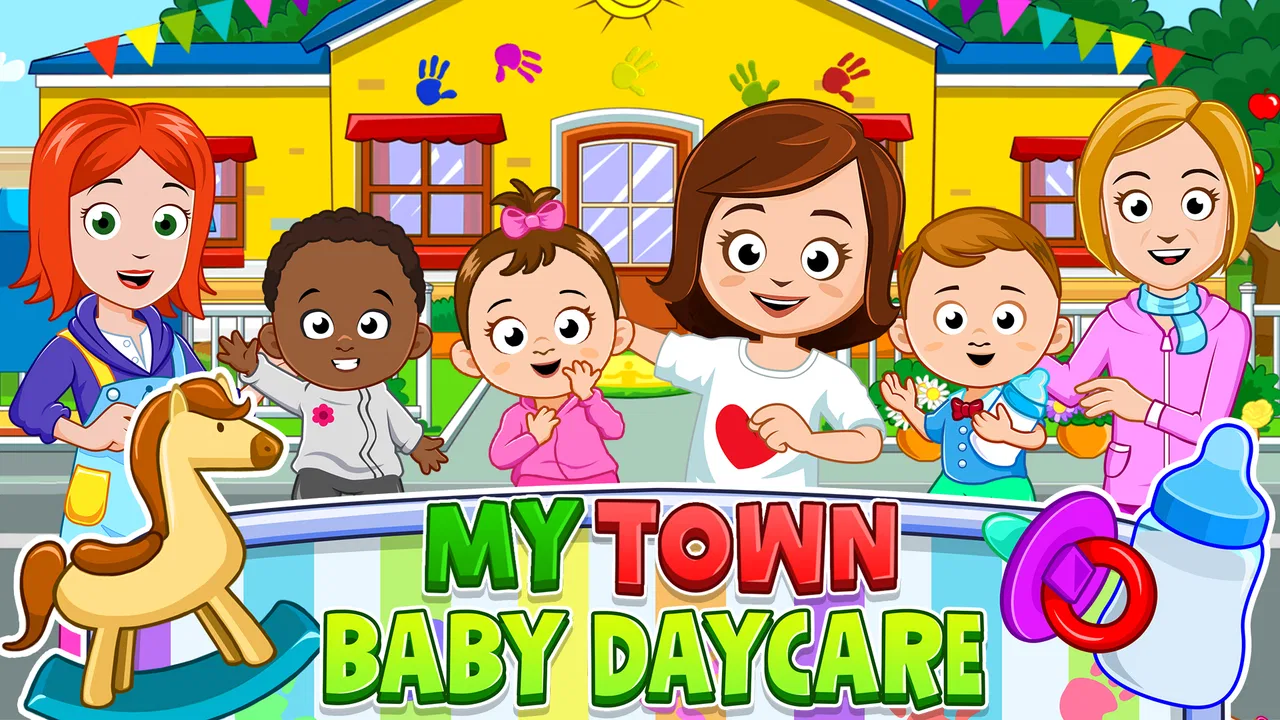
My Town : Daycare
- 4.1
- Rating
- 100.00K
- Installs
- $4.49
- Price

 Analysis by App-foxy
I spent time with My Town : Daycare as a relaxed, child-friendly imaginative play game rather than as a traditional level-based challenge. That distinction matters from the first few minutes. I was not pushed through missions, timers, or a demanding skill test. Instead, the appeal comes from deciding what happens in a daycare setting, moving between activities, and turning a familiar place into a small stage for personal stories.
That makes it a particularly approachable choice for children who enjoy pretend play more than winning. My first impression was that the game works best when an adult understands its purpose: it is an educational game built around creativity, role-play, and exploration, not a lesson app with a fixed curriculum. The developer is My Town Games Ltd, and the game has earned a 4.1 average from around 5.3 thousand ratings, with more than 100 thousand installs. Those figures suggest that its simple format has found a clear audience.
The asking price is $4.49, with individual in-app items priced at $0.99 each. It is rated Everyone, runs on Android 8.0 or later, and the current version is 7.03.09. I would look at those details before handing over a device, especially if the child uses an older phone or tablet. For families who want a calm digital playroom, the price may feel reasonable; for anyone expecting a large collection of structured educational exercises, the value is harder to judge.
You May Also Like

 AccuWeather: Weather Radar
AccuWeather Review: A Quick, Clear Forecast for Everyday Decisions
For everyday plans, the best forecast is the one you can understand quickly. AccuWeather makes rain timing, radar, and local conditions easy to act on, with a few trade-offs.

 Hill Climb Racing
Why Hill Climb Racing Still Turns Crashes Into One More Run
A tiny car, a bumpy hill and one more upgrade: Hill Climb Racing keeps resurfacing because its simple chaos makes every near-miss feel personal.

 AliExpress - Shopping App
AliExpress Makes Global Shopping Feel Personal, but Shoppers Bear the Risk
AliExpress turns a global marketplace into a pocket-sized discovery engine. Its reach is useful, its shopping loop compelling, and its trade-offs easy to miss.

 Lords Mobile: Kingdom Wars
Lords Mobile Is a Kingdom-Building Routine, Not a Quick Match
A case-by-case verdict on the building, battles, device demands, and social commitments that make Lords Mobile rewarding for some players and exhausting for others.

 PDF Scanner app - TapScanner
TapScanner Makes Paperwork Easier to Capture, Check, and Share
TapScanner makes scanning with a phone feel less like a rescue operation and more like a dependable step in getting work done. Its capture tools are useful, though not flawless.

 Block Blast!
 Shows How Much a Puzzle Game Can Leave Out
A quiet grid game shows why puzzle players increasingly value instant clarity, repeatable skill and low-pressure play—and where the genre still needs to catch up.
More From Our News Desk
View All News


How the daycare creates early goals without forcing a lesson
The first goals are self-created. A child can decide to act as a caregiver, arrange a scene, look after characters, or simply explore the different parts of the daycare and see what kind of story emerges. I found this more inviting than a screen that immediately tells the player what to complete. There is no pressure to understand a complicated rule set before play becomes enjoyable.
That freedom is also the central trade-off. In a conventional educational game, an early objective might be recognizing a shape, solving a puzzle, or finishing a short exercise. Here, the goal is closer to “make something happen.” One child might invent a morning routine, while another might focus on feeding, resting, or organizing a pretend classroom. The game gives room for those differences, which is useful when children of different ages or personalities share a device.
I especially liked the way the daycare setting gives imagination a practical frame. Pretend play can become vague when a game offers only a blank space, but a daycare naturally suggests relationships and routines. A child can think about who needs attention, what happens next, and how several characters fit into the same scene. Those are small decisions, but they encourage sequencing and storytelling without presenting themselves as homework.
A useful way to introduce it is to give the child a simple scenario rather than asking, “What do you want to do?” For example, I would suggest creating a full daycare morning: welcome the children, choose an activity, make time for rest, then prepare everyone to leave. The game does not need to spell out that sequence for it to become a meaningful play exercise. This approach helps children who enjoy the setting but initially feel lost when there is no obvious mission marker.
Another practical use is shared play between a child and an adult. Instead of taking control, I would ask questions such as, “Who is responsible for this character?” or “What should happen after lunch?” That turns the open-ended design into a conversation about choices and consequences. It is a better fit for a short, supervised session than for a child who needs a game to occupy them with a clearly measured learning target.
What counts as progress in an open-ended playroom
The progress signals are visual and personal rather than numerical. A child can see a scene become more elaborate as characters, objects, and activities are combined. Completing a story, changing the arrangement, or discovering a new way to use the setting can feel like an achievement even when the game does not announce a formal reward.
This is important because some players will interpret a lack of visible progression as a lack of content. I did not experience it that way, but I can see why a child accustomed to stars, badges, or unlocked stages might ask what they are working toward. The game’s feedback comes from the scene itself. When a child remembers how to recreate a favorite routine or invents a more complicated story, that is the progress signal.
Parents can make this clearer by treating each session as a small creative project. Ask the child to create a birthday scene, a quiet-time scene, or a “first day” story, then let them explain what each character is doing. This gives the play a beginning and an end without imposing a scoring system that may not belong in this kind of game. It also makes it easier to notice whether the child is genuinely exploring or simply tapping randomly.
One less obvious strength is that the game can support repeat play through variation rather than through a conventional unlock ladder. The same daycare environment can produce different stories depending on which characters are involved and how the child arranges the activity. That makes it more durable for imaginative players than for children who need a new challenge every few minutes.
At the same time, I would not describe this as a substitute for a structured early-learning program. If your priority is measurable practice in reading, arithmetic, spelling, or memory, a dedicated learning app will give you clearer evidence of improvement. This game’s educational value is more indirect: it encourages expression, sequencing, social role-play, and decision-making inside a familiar setting.
Difficulty and pacing: gentle by design, limited by design
The difficulty curve is intentionally soft. I did not feel that the game was built around increasingly difficult puzzles or reflex demands. That makes it comfortable for younger children and for players who become frustrated when a game punishes mistakes. The child can begin with simple interactions and gradually create more involved scenes as confidence grows.
For a parent, that gentle curve has a clear benefit: the child can often start playing without a long explanation. The downside is that there may be little to stretch an older child who wants rules, competition, or a clear sense of mastery. The game is not the right pick if you are looking for escalating challenges that test speed, memory, or problem-solving under pressure.
I would also avoid presenting the absence of difficulty as a flaw by itself. In a daycare role-play game, low friction is part of the experience. A child who is practicing independence may benefit more from controlling a scene freely than from being told that an answer is wrong. The question is whether the child enjoys making choices. If they do, the calm pacing can be a strength; if they need constant external goals, it can feel empty.
A good routine is to let the child explore freely at first, then introduce one constraint. For instance, ask them to tell a story using only a few characters, or to create a sequence in which every child receives a turn. This adds challenge without pretending that the game has a competitive mode. It also helps reveal whether the child is using the environment creatively or only repeating the same interaction.
The pacing suits short sessions particularly well. I could imagine using it while waiting at an appointment or during a quiet period at home, when a child wants something more active than watching a video but not as demanding as a puzzle game. Because the experience is not driven by a countdown, stopping midway is less disruptive. The child can return to the idea later rather than feeling that a failed attempt has wasted progress.
Does it keep children playing without relying on pressure?
The retention design appears to come from imagination and familiarity rather than from urgency. There is no need for me to chase a high score or protect a streak to keep the experience meaningful. A child returns because they want to replay a favorite situation, try a different arrangement, or continue a story they invented earlier.
I consider that a healthier form of repeat play for this age group. The child is not being pushed to return by increasingly demanding obstacles. Instead, the game acts like a digital toy box. That can make it easier for parents to set a natural stopping point: finish the current story, put the characters away, and come back another time.
Still, open-ended retention has limits. A child who expects frequent surprises, collectibles, or clearly announced rewards may lose interest sooner than a child who enjoys role-play. I would not buy it solely because the store page promises long-term engagement. Its staying power depends heavily on the child’s imagination and on whether an adult occasionally offers a new scenario.
The in-app purchase structure is another point worth considering. The game costs $4.49, and individual items are $0.99 each. That means the initial purchase is not the whole spending picture if a child becomes interested in additional items. I would make the purchasing rules clear before play and keep buying under adult control. Even when each item seems inexpensive, repeated requests can change the overall value calculation.
This is also where the game differs from many free educational alternatives. A free app may offer more obvious progression in exchange for advertising, energy limits, or frequent prompts. Here, the upfront price fits the idea of a calmer play experience, but the extra-item model means parents should still pay attention to how the child approaches the available content. If you want a completely fixed-cost experience, check the purchase settings before allowing independent use.
Who will enjoy it, and who should choose something else?
I would recommend it to children who already enjoy dolls, miniature playsets, family role-play, or making up conversations between characters. It is also a good candidate for siblings or a parent and child who can build a story together. The Everyone rating makes it broadly accessible, while the daycare theme gives younger players an easy starting point.
It can be especially useful when a child needs a quiet activity that still involves decisions. Rather than passively consuming a cartoon, the player chooses where attention goes and what the characters are doing. An adult can use that opening to discuss routines, caring for others, taking turns, and how different people might feel in the same situation.
I would skip it if your main requirement is a curriculum-driven game with clear learning outcomes. I would also look elsewhere for competitive play, difficult puzzles, fast reactions, or a strong campaign structure. Children who ask, “What level am I on?” after every session may not find enough direction here without an adult adding creative prompts.
Compared with ordinary educational alternatives, its advantage is emotional and imaginative rather than academic. Compared with a traditional sandbox game, its advantage is the focused daycare setting, which gives role-play a recognizable context. The trade-off is that it may offer less mechanical depth than a game built around construction, puzzles, or exploration. I would choose it when the goal is pretend play with a gentle educational flavor, not when the goal is skill drilling.
Device fit and practical expectations
The Android requirement is modest enough for devices running version 8.0 or newer, but I would still test the game on the actual tablet a child will use. A larger screen is generally more comfortable for arranging scenes and selecting small objects than a phone, especially when two people are looking at the display together.
The current version is 7.03.09, so I would keep the app updated through the normal device store process. More importantly, I would spend a few minutes exploring it before giving it to a younger child. That lets you understand the layout, decide which areas are suitable for independent play, and explain the purchase boundary in simple language.
Because the game is open-ended, supervision is most useful at the beginning rather than continuously. A short introduction can prevent the common problem of a child assuming there is a hidden “correct” way to play. Show them how to experiment, then step back and see what they create. If they become bored, offer a scenario instead of immediately moving to another app.
I also found that the best sessions have a defined purpose. “Play with the daycare” is vague, while “make a morning routine for three characters” gives the child a manageable creative task. Afterward, asking the child to describe the story adds value that the screen alone cannot provide. This is one of the strongest ways to turn a simple pretend-play game into a richer educational moment.
My progression verdict
My Town : Daycare succeeds when it is judged as a digital imaginative play space. Its early goals are easy to understand, its difficulty stays welcoming, and its repeat value comes from creating new situations instead of chasing rewards. I appreciate that the game does not need pressure to make a child feel involved. The daycare theme supplies enough structure to guide play while leaving room for personal stories.
Its limitations are equally clear. There is no reason to expect the kind of measurable advancement found in a spelling, math, or puzzle-focused title. Children who need constant unlocks and increasingly difficult tasks may run out of motivation. The extra-item pricing also means parents should decide in advance how they want purchases handled, rather than assuming the initial price settles every cost.
For my money, the game is a sensible recommendation for a younger child who enjoys pretend play and can benefit from gentle prompts about routines, cooperation, and storytelling. I would pair it with occasional adult interaction, not use it as a stand-alone teaching tool. If that matches what you want, the calm pacing and flexible daycare scenarios make it easy to return to. If you want a clear curriculum, competitive challenge, or a long progression ladder, another educational game will serve you better.
In the end, the progression verdict is deliberately modest but positive: this is not a game that tries to manufacture urgency. It gives children a setting, characters, and room to invent. When a child supplies the imagination, that can be enough to sustain meaningful play; when they need the game to supply every objective, the experience will feel much thinner.
FAQs for My Town : Daycare
01What is My Town: Daycare?
My Town: Daycare is a child-friendly pretend-play game where players can explore a colorful daycare environment and create their own stories. You can interact with different rooms, characters, toys, furniture, and everyday daycare objects. Rather than following a strict mission system, the app focuses on open-ended play, allowing children to invent scenarios involving childcare, games, meals, naps, and creative activities.
02Is My Town: Daycare suitable for children?
The game is designed primarily for young children and families, especially players who enjoy imaginative role-playing. Its simple controls, bright visuals, and familiar daycare setting make it easy to understand without advanced gaming skills. However, parents should still review the app’s age rating, privacy information, advertisements, and in-app purchase details on the relevant app store, since the available features and policies may vary by device and region.
03How does the gameplay work in My Town: Daycare?
Gameplay is based on tapping, dragging, and moving characters or objects around the daycare locations. Players can choose characters, change their positions, interact with toys and other items, and build their own stories instead of completing a fixed sequence of levels. This makes the experience relaxed and replayable, although children who prefer competitive challenges, scores, or clearly defined objectives may find it less structured.
04Does My Town: Daycare require an internet connection?
The core experience may be playable offline after the application has been installed, which is useful for travel or situations without a reliable connection. Nevertheless, some functions can depend on internet access, including downloading additional content, displaying advertisements, restoring purchases, receiving updates, or accessing store-related services. It is best to open the game once while connected and check which features remain available before relying on it offline.
05Is My Town: Daycare free to download?
My Town: Daycare may be available as a free download or may include optional paid content, depending on the platform, country, and current store listing. Before installing, check the official Google Play or App Store page for the latest information about advertisements, subscriptions, in-app purchases, and included locations or characters. Parents should also enable purchase restrictions if children will use the device independently.
Pros
- Bright
- child-friendly visuals make the daycare easy to explore.
- Many objects can be picked up
- moved
- and used in pretend-play scenes.
- Characters and locations encourage open-ended storytelling.
- Simple controls are suitable for younger children.
- Offline play is convenient for travel and limited internet access.
Cons
- Some content may require purchases or separate downloads.
- The open-ended format offers little guidance or structured gameplay.
- Repetitive actions can become predictable after extended play.
- Performance may vary on older phones and tablets.
- The game can encourage accidental in-app purchases without supervision.

My Town : Daycare
Gallery